Move information between browser and desktop apps without carrying the secrets with it.
Start from highlighted content in your browser or any Windows application. SafeRelay protects the selection once on your machine and delivers the resulting payload across every destination you armed.
ChatGPT, Claude, Gemini, internal tools, or web editors.
Reached simultaneously when Desktop Integration is enabled.
Apps armed with Ctrl+Alt+T (auto Shift+Insert for terminals).
Eligible armed Browser Relay tabs receive the exact same payload.
Nothing is inserted simply because an app or browser tab is connected. Click any destination below to arm or disarm it, then trigger a relay pulse to see where the protected payload lands.
Before your selection reaches any armed destination, SafeRelay replaces emails, API keys, credentials, PII, and your own custom protected terms with clean, deterministic placeholders.
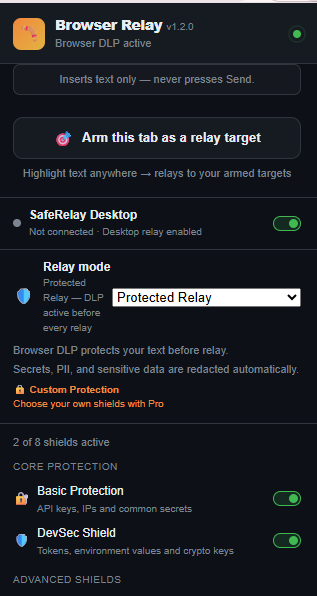
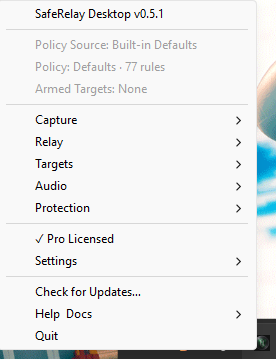
Watch an unedited screen capture of SafeRelay relaying across Windows and Chrome simultaneously, and inspect the real Browser Relay extension and SafeRelay Desktop tray app.
Arm your AI and web tabs, highlight text anywhere in the browser, and press Ctrl+Shift+8. Redacted locally before it lands in ChatGPT, Claude, Gemini, Gmail, and more.
OS-level protected relay across every Windows application, terminal, and browser tab — plus Safe OCR, local voice, and System Audio transcription.
Core protection, OCR, transcription, and the Browser↔Desktop bridge execute strictly on your machine. External AI processing is completely optional and only occurs if you configure and invoke it.
On-device DLP redaction runs in memory before every relay. Your selected text and sensitive values are never sent to LogicGrid AI servers.
Screen region text extraction and OCR redaction execute locally on your machine with zero cloud image uploads.
Microphone (Ctrl+Alt+W), System Audio (Ctrl+Alt+S), and Meeting Notes (Ctrl+Alt+M) run offline after a one-time speech model download.
Links Browser Relay and SafeRelay Desktop over a local Windows named pipe and Chrome Native Messaging — no cloud relay and no open network port.
Optional AI commands in the Safe Capture palette (Ctrl+Shift+A) and AI Vision use the provider you configure (OpenAI, Groq, OpenRouter, or a local Ollama instance) only when you explicitly invoke those features. Core SafeRelay relay, redaction, OCR, and voice never require an AI key.
Every way information moves across your screen and audio — protected by the same local engine.
Select any region on screen to extract text locally or redact sensitive values before they reach your clipboard or armed destination.
Record from your microphone and transcribe on-device with automatic DLP protection — no cloud voice API required.
Capture Windows speaker output via WASAPI loopback (or continuous Meeting Notes with Ctrl+Alt+M) and transcribe locally.
Highlight any codename, client identifier, or internal term and press Ctrl+Alt+G to redact it across every workflow immediately.
Inspect redacted placeholders safely as [PLACEHOLDER] → ****last4 or sanitize/restore local files without writing vault secrets to disk.
Off by default. When enabled from the tray, pressing Ctrl+C copies, redacts locally, and teleports the protected result into your previous window.
No window-switching dance. Nine core chords put capture, protection, target arming, and local transcription under your fingertips.
No account required to install. Your first 7 days include full access — and SafeRelay never stops working when the trial ends.
Buy here, then paste your key into the browser extension or SafeRelay Desktop. Standalone product licenses activate their respective product. Suite and Founder licenses include Browser Relay + SafeRelay Desktop. Teams & volume licensing: [email protected]
I spend a lot of time moving between terminals, browsers, documentation, tickets, and AI tools. Copy. Alt-Tab. Paste. Alt-Tab again. Over and over.
I wanted a faster way to highlight something and send it directly where I was working.
But while building that workflow, I kept noticing another problem: the things I was copying sometimes contained API keys, tokens, internal addresses, customer details, or pieces of .env files.
One tired Ctrl+V was enough to send something I never intended to share.
So SafeRelay became two things at once:
a faster way to move context between apps, and a safer way to move it.
Highlight text, press a hotkey, and SafeRelay protects sensitive values locally before relaying the protected version to the browser tabs and desktop apps you chose.
Less Alt-Tab. Less copy-paste risk. Stay in the flow.
The text you select is redacted locally and never sent to our servers. Two things are optional and only happen if you set them up: AI commands or AI Vision can send text or an image you approve to an AI provider you choose, and license validation sends only a license key and an anonymous install ID. Everything else — redaction, OCR, voice, System Audio, the bridge — stays on your device.
SafeRelay keeps working. Basic protection stays on; Pro-only capabilities become gated and the tray shows "Trial expired." On the free tier you get 3 custom terms, a 10-entry vault preview, and files up to 1 MB. Activate a Pro license anytime to unlock the rest.
Desktop protection, relay, and Safe OCR are local, and the Desktop Pro license verifies offline. Voice transcription works offline after its one-time speech model download. Browser Relay may require entitlement/network validation depending on tier, and optional AI features use the provider you configure.
The installer and app are code-signed via Azure Trusted Signing (publisher: LogicGrid AI, LLC). Windows SmartScreen may show a reputation notice for a newer publisher. Verify that the publisher is LogicGrid AI before continuing (click "More info" → "Run anyway"). You can also verify the SHA-256 checksum on the release page.
Browser Relay runs on Chrome 109+ today, with Firefox awaiting Mozilla approval. SafeRelay Desktop is a Windows app installed to Program Files. Standalone product licenses activate their respective product. Suite and Founder licenses include Browser Relay + SafeRelay Desktop.
Clear, authoritative guides covering first launch, arming targets, terminal paste handling, custom protected terms, and every keyboard shortcut.