Highlight once. Protect once.
Relay across browser and desktop.
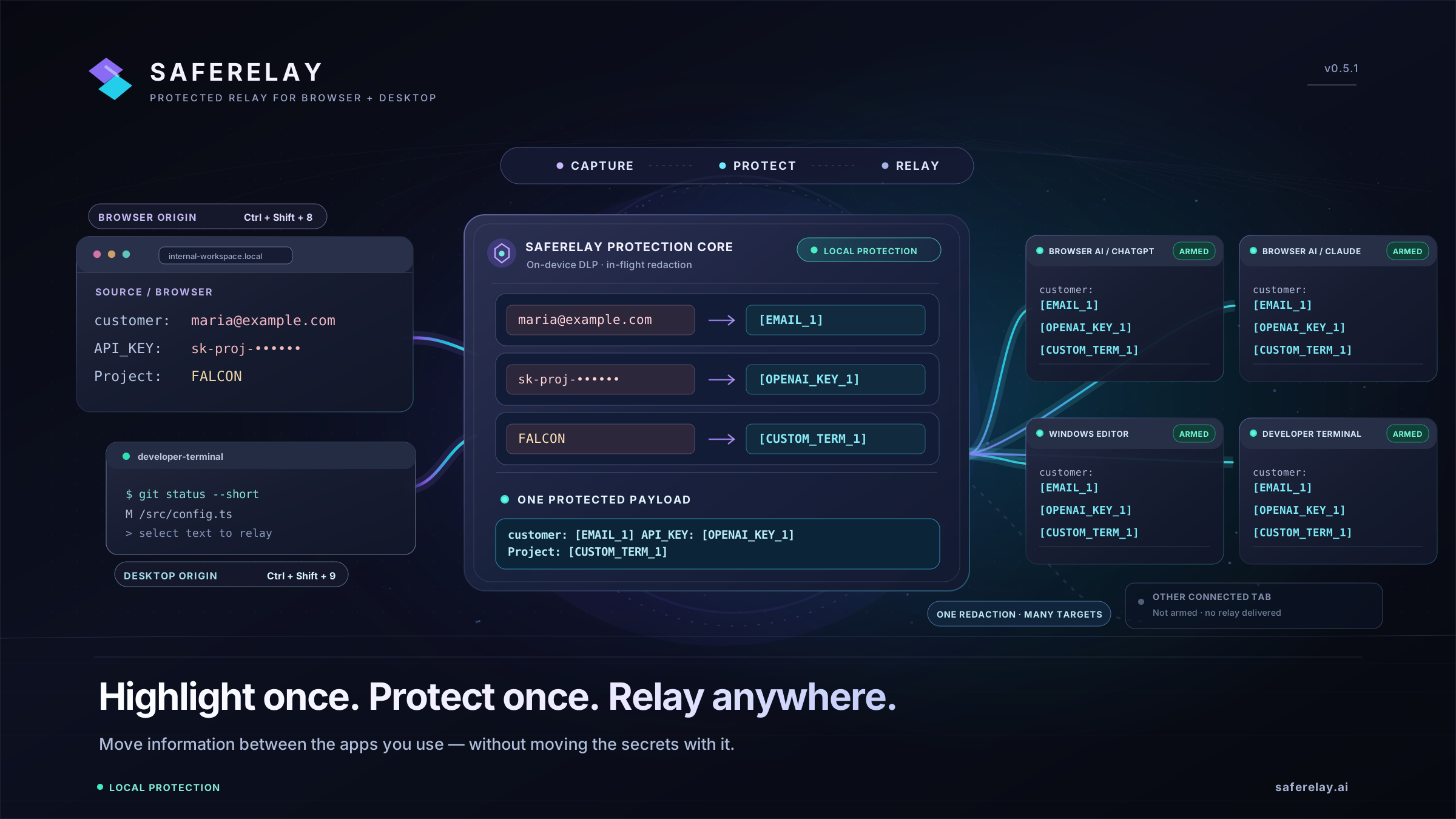
Move information between the apps you use — without moving the secrets with it. Each workflow below shows the exact source context, local protection transform, hotkey trigger, and armed destination behavior.
Choose a workflow to inspect
Every guide includes an interactive visual walkthrough, step-by-step setup, exact keyboard shortcuts, and factual scope boundaries.
Browser to Desktop Relay
Highlight text in a browser tab (documentation, support ticket, or cloud console), redact sensitive values locally, and relay to armed browser tabs and armed Windows desktop apps.
Desktop to Browser AI Relay
Highlight config files, logs, or notes inside a Windows desktop app (VS Code, Notepad, WordPad, terminal) and send the protected version directly into an armed ChatGPT, Claude, or Gemini tab.
Protect API Keys Before AI Prompts
Replace live OpenAI keys, AWS credentials, customer emails, and custom project codenames with structured placeholders locally before your prompt ever touches a browser input box.
Redact Terminal & Log Output
Sanitize stack traces, SSH session output, Kubernetes logs, and internal IP addresses before sharing troubleshooting context with AI assistants, incident tickets, or editors.
Safe OCR Screen Redaction
Extract text from uncopyable windows, RDP sessions, virtual machines, or error dialogs using local Windows OCR, run local DLP redaction, and review the protected result before pasting.
Local Voice & Audio Transcription
Transcribe spoken prompts from your microphone, capture system audio via WASAPI loopback, or record structured meeting notes locally on your CPU with no cloud transcription fallback.
How SafeRelay Routing Works Across Every Workflow
Whether you start in a browser tab, a desktop editor, a screen region, or a microphone recording, SafeRelay enforces the same core safety guarantees:
- Connected ≠ Armed: Connecting a browser tab or running a desktop app never makes it a target automatically. Only destinations you explicitly toggle to ARMED receive relayed text.
- One Protected Payload: SafeRelay scans and replaces detected secrets once locally before distributing the identical protected output to your armed destinations.
- Insert-Only Delivery: SafeRelay inserts text into active inputs or editors so you can inspect it. It never presses Enter or submits prompts on your behalf.
Quick Reference Guides
Need installation instructions, SmartScreen verification notes, or the complete hotkey matrix?
SafeRelay Desktop — Getting Started
Step-by-step installation, arming your first desktop target with Ctrl+Alt+T, and enabling Desktop Integration.
SafeRelay Desktop — Hotkey Reference
Compare Ctrl+Shift+8, Ctrl+Shift+9, Ctrl+Alt+V, Ctrl+Alt+R, Ctrl+Alt+G, and Safe Capture shortcuts.